Customer Relationship Management (CRM) software is a system that centralizes customer data, tracks interactions across sales, marketing, and service teams, and automates routine tasks throughout the customer lifecycle. It serves as a single source of truth for contact information, communication history, and deal progress.
This guide covers how CRM systems work, the core features to expect, the different types of CRM platforms available, and how CRM data connects to downstream systems like billing and revenue operations.
What is CRM software
What is CRM software and why do businesses use it?
Customer Relationship Management (CRM) software is a digital tool designed to manage, analyze, and optimize business interactions with prospects and customers throughout the customer lifecycle. It centralizes communication, sales pipelines, and customer data to improve retention, drive sales, and enhance marketing effectiveness.
In practical terms, a CRM acts as a single source of truth for everything related to your customers. Rather than hunting through email threads, spreadsheets, and sticky notes, teams can access contact details, purchase history, and conversation logs in one place.
Three Core Functions of CRM
CRM software typically handles three core functions:
- Centralizing customer data: Storing contact information, communication history, and purchase records in one accessible location
- Tracking interactions: Logging emails, calls, meetings, and support tickets automatically
- Automating routine tasks: Handling follow-up emails, data entry, and lead routing without manual effort
Who uses CRM Systems?
Which teams and roles benefit from customer relationship management systems?
CRM systems serve multiple teams across an organization. Sales representatives use them to track leads and manage their pipeline. Marketing teams rely on CRM data to segment audiences and measure campaign effectiveness. Customer service agents access customer history for faster issue resolution.
Beyond the obvious users, finance and revenue operations teams increasingly depend on CRM data. The CRM often serves as the starting point for billing, revenue recognition, and investor metrics like ARR and MRR.
Why Customer Relationship Management Software matters for your business?
Why is CRM management software essential for growing companies?
As companies scale, managing customer relationships through spreadsheets and email threads becomes unsustainable. A company with 50 customers can probably get by with a shared spreadsheet. A company with 500 customers cannot.

Single source of truth for customer data
CRM eliminates scattered spreadsheets and siloed information. When everyone works from the same accurate, up-to-date customer records, handoffs between teams become smoother and errors decrease.
Cost savings and efficiency gains
Automation reduces manual work and human error. Relationship management software prevents duplicate efforts, lost opportunities, and the revenue leakage that comes from disorganized customer data.
Alignment across sales marketing and service teams
CRM tools break down departmental silos. When all teams see the same customer journey, the customer experience becomes consistent from first touch through renewal and expansion.
Key Benefits of CRM Software
What are the main benefits of using customer relationship management tools?
Different teams experience different advantages from CRM adoption.
Sales team benefits
Sales teams gain improved pipeline management, deal tracking, and forecasting accuracy. CRM systems reduce administrative burden, allowing reps to spend more time selling and less time on data entry.

Marketing team benefits
Marketing teams benefit from lead scoring, campaign tracking, audience segmentation, and attribution. Customer management software connects marketing efforts directly to revenue outcomes.
Finance and RevOps benefits
CRM data flows into billing, revenue recognition, and SaaS metrics. Clean CRM data is critical for accurate ARR/MRR reporting and connects the entire quote-to-cash cycle.
Core Features of Customer Relationship Management Systems
What features are common in CRM solutions?
Most CRM platforms share a common set of capabilities, though the depth and sophistication vary by vendor and price tier.
| Feature Category | What It Does | Example Use Case |
|---|---|---|
| Contact Management | Stores customer profiles and history | View all interactions before a sales call |
| Pipeline Tracking | Visualizes deal stages and progress | Forecast quarterly revenue |
| Workflow Automation | Triggers actions based on rules | Auto-assign leads by territory |
| Reporting | Generates dashboards and insights | Track conversion rates by source |
| Communication Tools | Logs emails, calls, and messages | Maintain conversation history |
Contact and Account Management
Customer relation management software stores and organizes contact details, company records, and relationship hierarchies. A “contact” is an individual person, while an “account” is the company or organization they belong to.
Pipeline and Opportunity Tracking
CRM software visualizes the sales funnel, tracks deal stages, and enables forecasting. An “opportunity” represents a potential sale, and the “pipeline” is the sequence of stages an opportunity moves through from lead to close.
Workflow Automation
Automated lead routing, task creation, email sequences, and reminder triggers significantly reduce manual data entry. Rules can be configured to match your specific sales process.
Reporting and Dashboards
Built-in analytics provide visibility into sales performance, conversion rates, and customer insights. Most platforms offer both pre-built reports and customizable dashboards.

Communication and Collaboration Tools
Email integration, activity logging, internal notes, and team notifications keep everyone informed. No customer interaction falls through the cracks when the CRM captures it automatically.
How CRM Software Works
How does a CRM system actually function day-to-day?
Understanding the data flow within a CRM helps clarify how the system delivers value.
1)Capturing Customer Data
Customer relationship management solutions collect information from various entry points, including web forms, email sync, manual entry, and integrations with other tools like marketing automation platforms.
2) Organizing and Storing Information
A CRM structures data into records (contacts, accounts, opportunities), fields (name, email, deal value), and relationships between them. This creates an organized, searchable database.

3) Automating Workflows and Tasks
Rules and triggers execute actions automatically. For example, a new lead might be assigned to a sales rep based on territory, or a follow-up task might be created three days after a demo.
4) Analyzing Data for Actionable Insights
CRM tools transform raw data into reports, trends, and forecasts. Modern systems often include predictive capabilities to anticipate customer behavior and business outcomes.
5) Enabling Cross-Team Collaboration
Shared access, activity feeds, notifications, and @mentions keep teams aligned. Everyone can see the full context of customer interactions regardless of which department initiated them.
Types of CRM Systems
What are the different types of CRM systems on the market?
CRM systems generally fall into three categories, each with a different primary focus.
Operational CRM
Operational CRM focuses on sales, marketing, and service automation. It handles day-to-day customer-facing processes and is the most common type for small and mid-sized businesses.

Analytical CRM
Analytical CRM emphasizes data analysis, customer insights, and trend identification. Organizations use it for strategic decision-making and advanced customer segmentation.
Collaborative CRM
Collaborative CRM focuses on sharing customer data across departments and sometimes with external partners. The goal is improving the customer experience through unified communication.
Cloud vs On-Premise CRM
What is the difference between cloud-based and on-premise CRM software?
The deployment model you choose affects cost, control, and IT requirements.
Cloud CRM
Cloud CRM is hosted externally and accessed via a web browser, typically using a subscription-based pricing model. Benefits include no hardware maintenance, automatic updates, and easy remote access. Most modern client relationship management software is cloud-based.

On-Premise CRM
On-premises CRM is installed on a company’s own servers and requires internal IT infrastructure. Benefits include full control over data and security. It involves higher upfront costs but no ongoing subscription fees.
Hybrid CRM Deployment
Some organizations combine approaches, hosting certain components on-premises while others run in the cloud. Large enterprises with specific compliance or legacy system requirements typically use this model.
AI and Automation in CRM Tools
How are AI and automation changing customer relationship management?
AI and automation are transforming CRM from a record-keeping system into an intelligent assistant. Modern CRM platforms add layers of intelligence to traditional features.
- Predictive lead scoring: Ranks prospects by their likelihood to convert
- Automated data entry: Captures information from emails and calls automatically
- Intelligent recommendations: Suggests next best actions for sales reps
- Conversational AI: Powers chatbots and virtual assistants for support and sales
- Sentiment analysis: Gauges customer satisfaction from text-based interactions

How CRM Software Integrates with Other Applications
What systems does CRM software typically connect with?
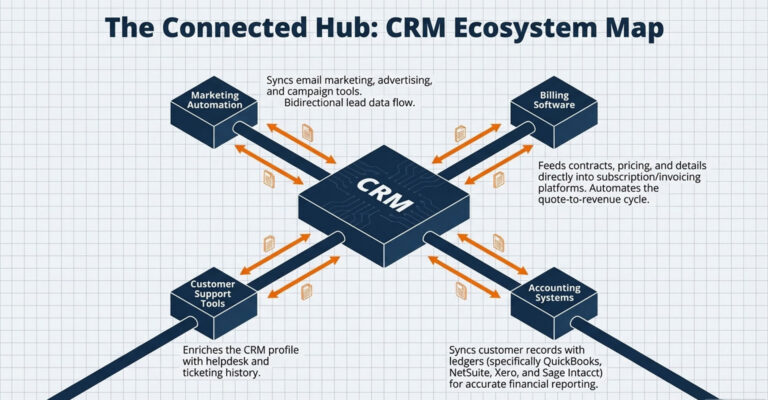
Integration is critical for creating seamless data flow and avoiding information silos.
CRM and Marketing Automation Platforms
CRM syncs with email marketing, advertising, and campaign tools. Lead data flows in both directions for cohesive marketing and sales efforts.
CRM and Billing Software
CRM data, including contracts, pricing, and customer details, feeds directly into subscription billing and invoicing systems. For SaaS and recurring revenue businesses, this connection is especially important. Billing platforms can ingest CRM data to automate the entire quote-to-revenue cycle.
CRM and Accounting
Integration with systems like QuickBooks, NetSuite, Xero, and Sage Intacct allows customer records and transactions to sync for accurate financial reporting.
CRM and Service Desk
Integration with helpdesk and ticketing systems enriches the customer profile with valuable service and support history.
How to Choose the Right CRM Solution
What factors matter when selecting customer relationship management software?
Follow this decision framework to find the best fit for your business.
1) Define your business requirements
Start with use cases, not features. Identify the problems you want to solve and which teams will use the software. Document your “must-have” versus “nice-to-have” features.
2) Evaluate integration capabilities
Check for compatibility with your existing tools, including email, calendar, marketing, billing, and accounting systems. Assess whether native integrations exist or if you will require API-based custom connections.

3) Assess scalability and flexibility
Consider your company’s growth trajectory. Can the CRM handle more users, data, and complexity without requiring a major overhaul?
5) Test with a pilot implementation
Before a full rollout, run a trial with a small, representative team. This validates usability, performance, and fit with your actual workflows.
How CRM connects to Billing Systems
How does CRM data flow into billing, revenue recognition, and SaaS metrics?
CRM is the system of record for customer and deal data, which downstream systems require for accurate billing, revenue schedules, and investor metrics. For SaaS and subscription businesses, the CRM is the starting point of the quote-to-cash cycle.

Connecting CRM to billing and revenue automation platforms ensures contract data flows seamlessly into invoices, revenue schedules, and board-ready SaaS metrics like ARR, MRR, and net revenue retention.
Frequently Asked Questions about CRM Systems
What is the best CRM software for small businesses?
Popular options include HubSpot CRM (offers a robust free tier), Zoho CRM (affordable all-in-one suite), and Pipedrive (known for ease of use and pipeline focus). The best choice depends on your specific workflow requirements and budget.
How long does CRM implementation typically take?
Implementation timelines range from a few days for simple cloud-based setups to several months for enterprise deployments with complex customizations and data migrations.
What is the difference between CRM and ERP software?
CRM software manages customer-facing activities like sales, marketing, and service. ERP (Enterprise Resource Planning) software handles back-office operations like finance, HR, inventory, and manufacturing.
Can CRM software integrate with billing and invoicing systems?
Yes, most modern CRM solutions offer integrations with billing platforms through native connectors or APIs, allowing customer and contract data to flow directly into invoicing and subscription management workflows.
What is the most popular CRM platform used by companies?
Salesforce is widely recognized as the market leader, though HubSpot, Zoho, Microsoft Dynamics, and Pipedrive are also widely adopted depending on company size and industry.